ZATCA Phase 2 e-invoicing from your normal invoice
Connect to Fatoora with an OTP from your portal, then invoice as you do today. Xrero builds stamped UBL 2.1 XML and QR, submits tax invoices for clearance and reports simplified ones within 24 hours.
From OTP to a cleared invoice
Onboarding starts from your own Fatoora account and does not change how you issue invoices.
Connect with your OTP
You generate the OTP in your own Fatoora portal. Xrero's wizard requests the certificates in your business's name and runs the six compliance checks. Simulation and production are both supported.
Invoice as usual
Create a tax or simplified invoice from the same screen. Xrero builds the UBL 2.1 XML with cryptographic stamp and 9-tag QR and sends it for clearance or reporting automatically.
Keep everything
Every cleared invoice is stored with its XML, PDF, QR code and the answer from the Zakat, Tax and Customs Authority (ZATCA) in a six-year archive, with an append-only transmission log and ZATCA-named exports.
What the integration phase actually requires
The requirement is not a nice-looking invoice but a chain of documents that cannot be tampered with. This is how Xrero builds it.
- Invoice counters (ICV) never reset, and every invoice carries the previous invoice hash (PIH).
- Append-only transmission log: every request and every ZATCA answer is kept and never deleted.
- A cleared invoice cannot be edited or deleted; corrections are credit or debit notes referencing the original.
- Six-year archive with exports named the way ZATCA asks for them.
- Readiness dashboard with certificate status and every ZATCA answer, plus an automatic retry queue.
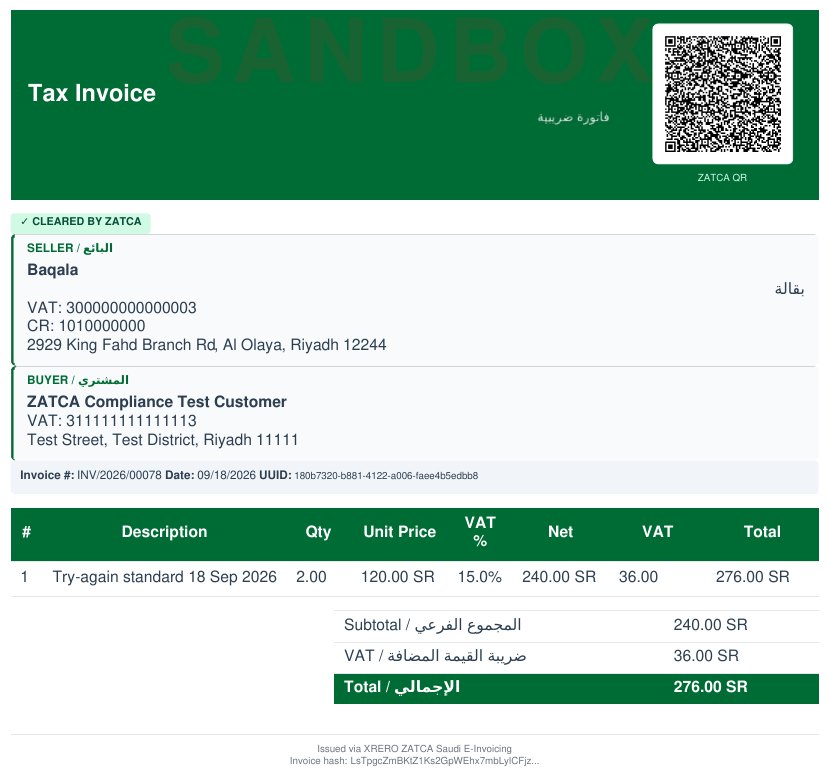
Four documents, two paths, one chain
The documents, paths and chain the integration phase asks for, in one module included in every licence.
Four document types
Tax invoices, simplified tax invoices, credit notes and debit notes, all as UBL 2.1 XML with a cryptographic stamp, a 9-tag QR code and a PDF carrying the QR.
Clearance versus reporting
B2B tax invoices are cleared by ZATCA before they reach the customer. B2C simplified invoices are reported within 24 hours of issue. The path follows the invoice type.
Counters and hash chain
Every invoice carries an ICV counter that never resets and a PIH hash of the previous invoice, forming a chain where no link can be removed or altered unnoticed.
Six-year archive, API and webhooks
A six-year archive with ZATCA-named exports, plus an API and webhooks so your other systems can read invoice records and clearance status.
Our ZATCA status, stated plainly
We claim no ZATCA listing or endorsement that has not been granted. This is what has actually happened, with dates.
Validated on ZATCA's developer sandbox: all six compliance document types accepted, with live clearance, reporting and a credit note accepted with zero warnings.
A Saudi establishment's device was onboarded on the Fatoora simulation environment through Xrero: six compliance documents accepted, production CSID issued in simulation.
The application to be listed in ZATCA's solution-provider directory was submitted and is under review.
You will not find any claim on this site that Xrero is listed or endorsed by ZATCA before ZATCA decides on the application. The list is indicative: any compliant solution may be used, listed or not.
Know your connection status before anyone asks
One screen shows certificate status, every ZATCA answer and what is waiting in the retry queue. Try it in the read-only demo (username demo, password demo) under Saudi Tools, then ZATCA Reports.
- Certificate status and environment: simulation or production.
- Every ZATCA answer for every document, kept as it arrived.
- Automatic retry queue for documents that did not get through.
- Append-only transmission log; nothing is deleted from it.
- API and webhooks to notify your other systems of each invoice's status.
Simplified invoices reported straight from the till
An Arabic cashier prints the receipt with its QR code and reports the simplified invoice to ZATCA within 24 hours.
- Arabic cashier screen with receipt printers and card payments.
- Every receipt is a simplified tax invoice with the 9-tag QR code.
- Reported to ZATCA from the till itself, within the 24-hour window.
- Every receipt is kept with its QR code and ZATCA's answer in the same six-year archive as your other invoices.
Guides that answer e-invoicing questions
Short references with official sources, written for accountants and owners.
ZATCA Phase 2 integration with Fatoora, step by step
Phase 2 of Saudi e-invoicing connects your invoicing system to ZATCA's Fatoora platform from your wave's integration date. It takes four steps: log in to the Fatoora…
Read the guideGuideZATCA e-invoicing penalties, and what to do after a notice
E-invoicing violations in Saudi Arabia start with a warning and 30 to 60 days to fix them, not an immediate fine. Repeat fines start at SAR 1,000, 5,000 or 10,000…
Read the guideGuideTax invoice vs simplified tax invoice: what is the difference?
A tax invoice is generally the B2B document: it shows the buyer's name and address and ZATCA clears it before the buyer receives it. A simplified tax invoice is…
Read the guideQuestions we get about Phase 2
Straight answers, with no promises we cannot keep.
Ask the Riyadh teamWhat is Phase 2 of e-invoicing?
It is the integration phase with ZATCA's Fatoora platform. Tax invoices are sent to ZATCA and cleared before they are delivered to the customer; simplified tax invoices are reported within 24 hours. Documents are issued as UBL 2.1 XML with a cryptographic stamp, a QR code and a hash chain that links each invoice to the previous one.
Which wave am I in?
ZATCA notifies businesses at least six months before their integration date. The latest announcement, Wave 25, covers businesses whose VAT-able revenue exceeded SAR 187,500 in any year from 2022 to 2025. Check the notification ZATCA sent your business, or contact us in Riyadh and we will read it with you.
What is the difference between clearance and reporting?
Clearance is for B2B tax invoices: the invoice goes to ZATCA and is cleared before it reaches the customer. Reporting is for B2C simplified tax invoices: the invoice is issued at once and reported to ZATCA within 24 hours. Xrero handles both paths from the same screen.
Is Xrero on ZATCA's solution-provider list?
Not yet. ZATCA qualifies solution providers and publishes those that pass in a guiding, non-binding list, which it says is not an approval of their solutions; a solution can also be compliant through verification by a third party or the business's self-certification. What has actually happened: validation on ZATCA's developer sandbox on 18 September 2026, onboarding of a Saudi establishment's device on the Fatoora simulation environment on 28 September 2026, and a directory listing application submitted the same day, now under review.
What do I need to start?
Access to your business's Fatoora portal to generate the OTP, and your business details as registered with ZATCA. Xrero's wizard requests the certificates in your business's name, never ours, and runs the six compliance checks. You can start on the simulation environment and move to production. The trial is 15 days with no credit card.
What happens if the connection to ZATCA drops?
The document enters the automatic retry queue and is resent when the connection returns, and it shows on the readiness dashboard with its status. The transmission log keeps every attempt and every answer. Simplified invoices have a 24-hour reporting window; a tax invoice is not delivered to the customer until it is cleared.
Start on simulation before your wave date
15 days free, no credit card. Start on the simulation environment from your own Fatoora account; the setup packages include training on your own invoices, in Arabic or English.
Page updated 28 September 2026